Funding Your CloudResearch Account
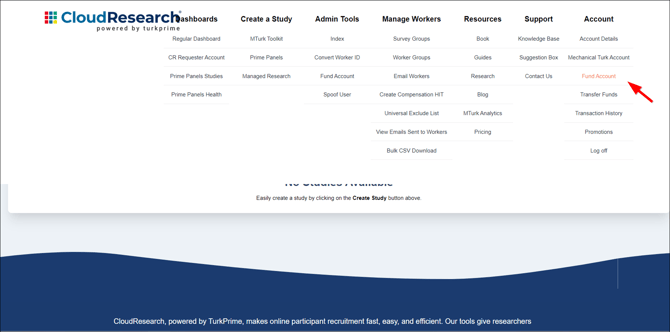
To fund your CloudResearch account (also known as “Lab Balance”), go to the header of the main page to click Account and select Fund Account.
![knowledge base_account options_[fund account highlight]_12.22.2020](https://go.cloudresearch.com/hs-fs/hubfs/knowledge%20base_account%20options_%5Bfund%20account%20highlight%5D_12.22.2020.png?width=670&name=knowledge%20base_account%20options_%5Bfund%20account%20highlight%5D_12.22.2020.png)
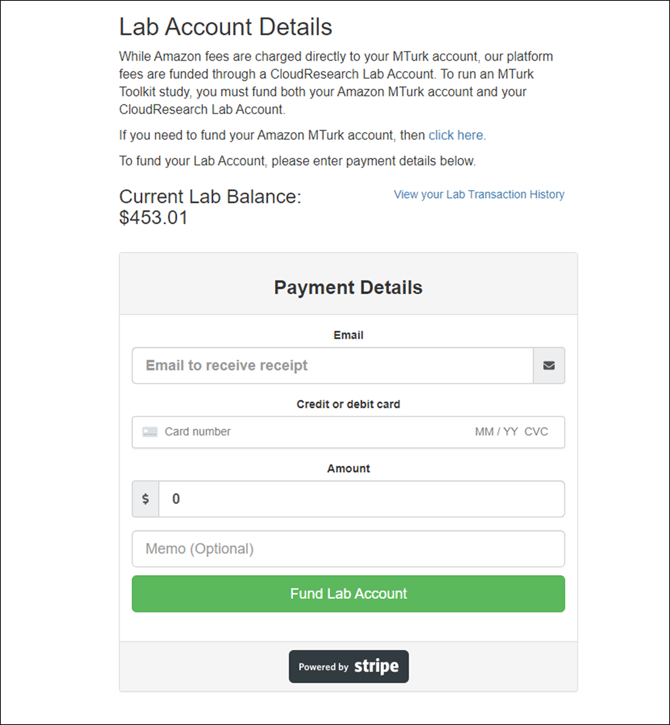
On the next page, you can enter your credit card information and the amount you’d like to add to your Lab Balance.
![knowledge base_account options_[fund account page]_12.22.2020](https://go.cloudresearch.com/hs-fs/hubfs/knowledge%20base_account%20options_%5Bfund%20account%20page%5D_12.22.2020.png?width=670&name=knowledge%20base_account%20options_%5Bfund%20account%20page%5D_12.22.2020.png)