
1. Number of Participants
Enter the number of participants you wish to sample. Prime Panels has tens of millions of participants worldwide, so sampling very large groups of people is possible.
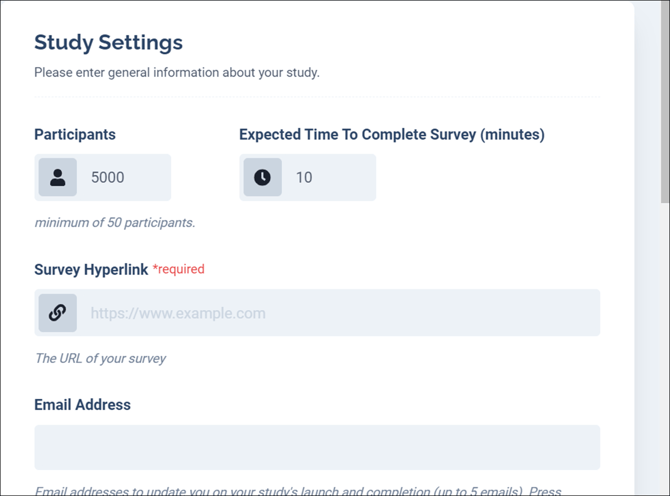
2. Expected Time
Enter how long you expect it will take participants to complete the study. On Prime Panels, the length of your study affects the price. If your study takes participants significantly longer than the expected time, we may have trouble obtaining the sample.

3. Survey Hyperlink
Copy and paste the URL from your survey into the survey hyperlink box.

4. Email Address
Provide up to five email addresses to associate with the study. When your study launches and when data collection is complete, we will send a message to the email addresses you list on this page.
5. Set a Survey Group
If you plan to run several Prime Panels studies at the same time, a Survey Group ensures no one takes part in more than one of them. Any participant who accepts a study in the group is disqualified from the other studies in that group. You can only add studies that have not launched yet, so add each study to the group during setup.
To keep people who completed a past study out of your current study, use Exclude Past Participants (step 6) instead.

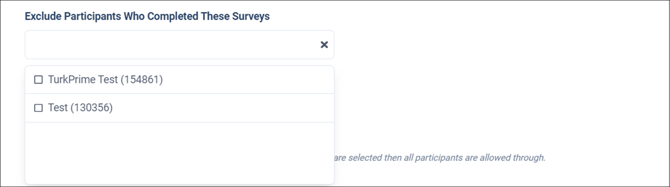
6. Exclude Past Participants
You can exclude participants from past studies by selecting the study title from the dropdown options. Anyone who completed your past study will be unable to complete your current study. Note: This does not include studies that are currently live.
7. Device Controls
Limit the type of device participants must be using to complete your survey.
